
Your Mac. Protected anywhere.
A simple extra layer of security.
Protect your Mac when you step away.
Your Mac. Protected anywhere.
A simple extra layer of security.
Protect your Mac when you step away.
A simple extra layer of security.
Protect your Mac when you step away.
Theft deterrence thats there when you step away
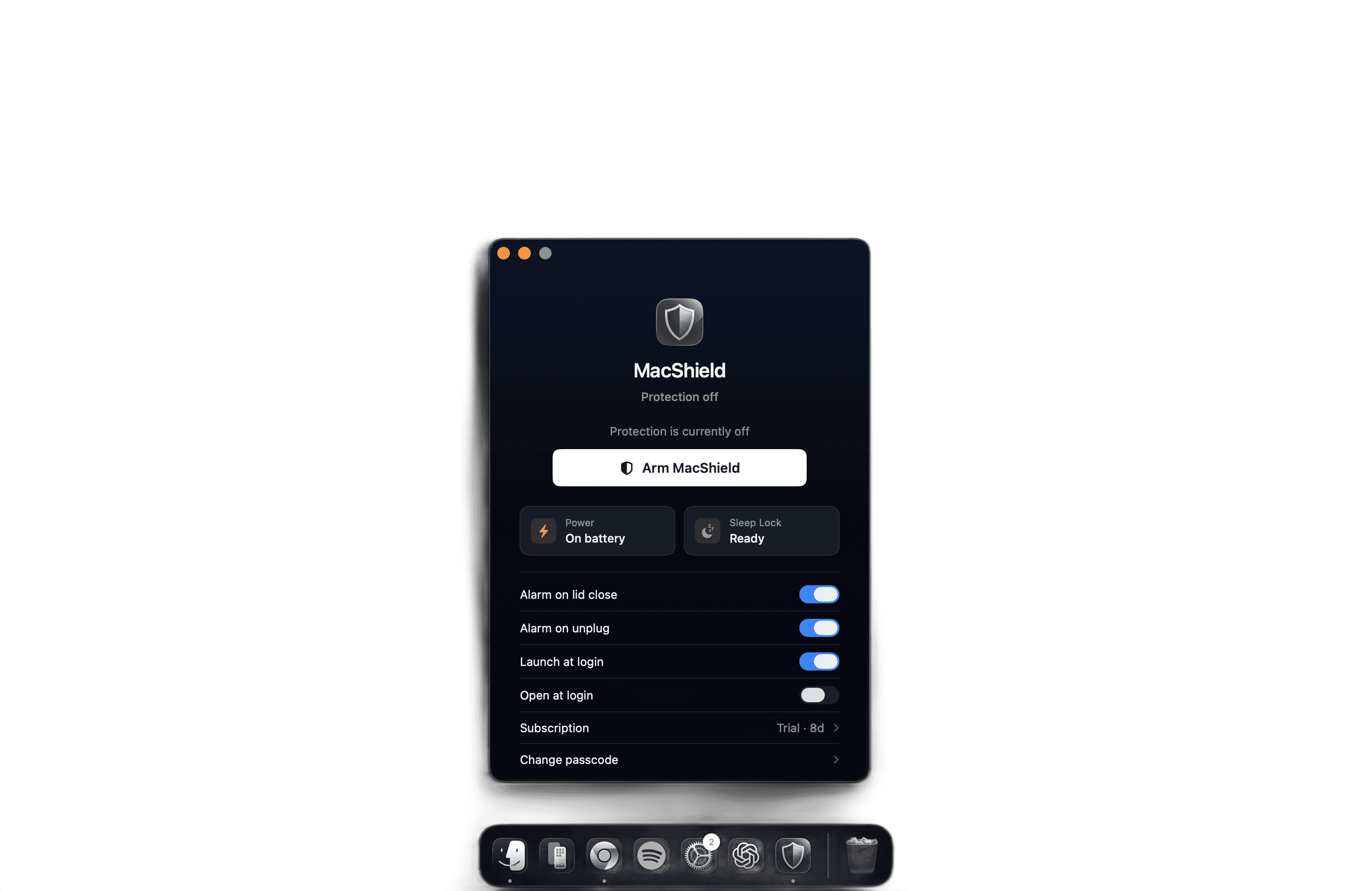
Arm MacShield before leaving your Mac unattended. If a trigger is detected, it helps draw immediate attention.

Lid Protection
Detects when your MacBook lid is closed while armed and immediately triggers the alarm.


Cable Detection
Unplugging the charging cable while MacShield is armed triggers the alarm -catching a common step before someone can walk away with your Mac.

Visible deterrent
An on-screen warning shows that MacShield is armed, discouraging someone from attempting to take the device in the first place.
Theft deterrence thats there when you step away
Arm MacShield before leaving your Mac unattended. If a trigger is detected, it helps draw immediate attention.
Lid Protection
Detects when your MacBook lid is closed while armed and immediately triggers the alarm.
Cable Detection
Unplugging the charging cable while MacShield is armed triggers the alarm -catching a common step before someone can walk away with your Mac.
Visible deterrent
An on-screen warning shows that MacShield is armed, discouraging someone from attempting to take the device in the first place.
Protection
Three Layers of Protection
MacShield watches for the actions most likely to happen when someone tries to take your Mac.
Power Protection
(01)
Lid Protection
(02)
Visible Deterrence
(03)
Protection that stays focused.

Arm in seconds before stepping away from your Mac.
Power Protection
(01)
Lid Protection
(02)
Visible Deterrence
(03)
Protection that stays focused.
Arm in seconds before stepping away from your Mac.
Power Protection
(01)
Lid Protection
(02)
Visible Deterrence
(03)
Protection that stays focused.
Arm in seconds before stepping away from your Mac.
SOLUTION
PERFORMANCE
Simple protection. Instant deterrence.
Arm MacShield in seconds, then let it watch for the key actions associated with taking an unattended MacBook.

Power Protection
Detects a charging cable being disconnected while protection is armed.
Power Protection
Detects a charging cable being disconnected while protection is armed.

Arm in Seconds
Activate protection quickly before stepping away from your Mac.
Arm in Seconds
Activate protection quickly before stepping away from your Mac.

Sound the Alarm
An audible alarm can respond when a configured trigger is detected.
Sound the Alarm
An audible alarm can respond when a configured trigger is detected.
Built around your Mac

Built around your Mac
MACSHIELD
A focused theft-deterrence experience designed for common MacBook theft scenarios.
Built around your Mac
MACSHIELD
A focused theft-deterrence experience designed for common MacBook theft scenarios.
PROTECTION FOR THE MOMENTS YOU STEP AWAY
Designed for cafés, libraries, universities, and shared spaces where a brief step away can leave a MacBook exposed.
Power
Charging disconnect detection
When armed while charging, MacShield can respond if the charging cable is unplugged.
Lid
Lid closure detection
MacShield can respond when the lid is closed while protection is armed.
Alarm
Immediate audible response
If a configured trigger is detected, MacShield sounds an alarm through your Mac at maximum volume that can only be stopped by you.
FAQ
Frequently Asked Questions
Clear answers for protecting your MacBook.
What is MacShield?
MacShield is a lightweight macOS theft-deterrence app for the moments you need to step away from your MacBook.
What happens when MacShield is armed?
MacShield displays a clear armed warning and watches for the protection triggers you have configured.
What can trigger the alarm?
While armed, MacShield can respond to a charging cable being disconnected or the MacBook lid being closed.
Will MacShield prevent my MacBook from being stolen?
No. MacShield is an additional theft-deterrence layer, not a guarantee against theft or a replacement for sensible physical security.
How do I arm and disarm MacShield?
MacShield can be armed in seconds using the arm button on the app or on the top right mac menu bar icon before you step away and simple to disarm by pin/fingerprint when you return.
What is MacShield?
MacShield is a lightweight macOS theft-deterrence app for the moments you need to step away from your MacBook.
What happens when MacShield is armed?
MacShield displays a clear armed warning and watches for the protection triggers you have configured.
What can trigger the alarm?
While armed, MacShield can respond to a charging cable being disconnected or the MacBook lid being closed.
Will MacShield prevent my MacBook from being stolen?
No. MacShield is an additional theft-deterrence layer, not a guarantee against theft or a replacement for sensible physical security.
How do I arm and disarm MacShield?
MacShield can be armed in seconds using the arm button on the app or on the top right mac menu bar icon before you step away and simple to disarm by pin/fingerprint when you return.
Get the companion
App
The companion app allows MacShield to function during lid close.
For the full protection
Get the companion
App
The companion app allows MacShield to function during lid close.
For the full protection
Get the companion
App
The companion app allows MacShield to function during lid close.
For the full protection